
MCP Dev Summit Toronto · Tue 6 Oct · 11:50–12:15 · MCP Demo v3.0.1

MCP as a Platform
What I Learned Building a Portfolio of MCP Servers

One server teaches you the protocol. A portfolio teaches you what MCP actually is — and the mistakes I only found by building the next one.

Every example here is in one small server you can clone tonight: MCP Demo v3.0.1 — github.com/markusvankempen/mcp-ticket-demo

Markus van Kempen · Mensch, Maker and Developer
No bug too small, no syntax too weird.
The running example · demo

Meet the ticket server.
Every example today runs on it.

# in the IDE chat > Show me all tickets and their status. → run_query schema: "tickets" ← TCK-1001 open 0 tools discovered after I registered the server TCK-1002 pending Customer never got the reply — ticket looks fine in the API TCK-1003 solved mcp.json worked yesterday, 404 today

Local: localhost:8787 · started with MCP_MODE=http npx mcp-ticket-demo · tickets are only the stand-in

Every seed ticket is a mistake from this talk.
The rest of the talk is how each one got fixed.
How the platform grew

Every answer raised
a new question.

01

Prove it's up

02

Easy to ship and use

03

Which server answers?

04

When OK wasn't OK

05

Past 100 tools

06

A control plane

07

Remote configuration

08

The server talks back

Running example: mcp-ticket-demo. Tickets are only the stand-in.

Where it starts

The first version is
deceptively simple.

client → MCP server → your API | +-- tool: request(path, method, query, body) That is a working MCP server. Then the real requests arrive: create one, update one, close one a safer default than "return everything" what "no results" means, so it stops retrying who is allowed to call the write tools and how anyone finds the server at all
SDK

MCP TypeScript SDK

McpServer plus the stdio, Streamable HTTP and SSE transports. 1.30.

SCHEMAS

Zod

Input and output schemas. A bad call is refused before your code runs.

HTTP

Express 5

/mcp, /health, /test and /admin on one port.

SHIP

npm · registry · vsce

npm publish, mcp-publisher for the MCP Registry, @vscode/vsce for the extension.

Where it starts · names

With a few tools, names barely matter.
With dozens, the name is all the model has.

Ticketing is just the stand-in. Any API works the same way — orders, assets, containers. For this talk the stand-in is a small support-ticket system, packaged as MCP Demo.

The early question

"Can the model call this API?"

The later question

"Can a developer understand and operate this tool safely?"

search_tickets(query, status, requester_email, limit) is easier to use — and safer — than: request(path, method, query, body) The second one is less code for me and every decision for the model.
01 · Prove it's up · demo

The IDE says zero tools.
Ask the server.

HOST = http://localhost:8787 · started with MCP_MODE=http npx mcp-ticket-demo

# what the IDE shows 0 tools discovered No error. No warning.
$ curl -s $HOST/health?format=json { "ok": true, "version": "3.0.1", "tools": 19 }
The client can't tell you why.
The server's count can: the problem is the connection.

Try it: curl -s localhost:8787/health?format=json

01 · Alive is not works · demo

Alive is not works.
Ask the tools, not the process.

# the MCP standard: ping → { "method": "ping" } ← { "result": {} } The process answered. That is all it says.
$ curl -s $HOST/test?format=json { "ok": true, "steps": [ { "name": "tickets (open)", "ok": true }, { "name": "run_query tickets", "ok": true } … ] }
Ping proves the process is alive.
Only calling the tools proves they work.

Try it: curl -s localhost:8787/test?format=json · curl -s localhost:8787/tools?format=json · then /help and describe_server, the tool to call first.

02 · Easy to ship and use · demo

From curl and guesswork
to one install.

Editor extensionShips the server
Writes every mcp.json
Diagnoses the chain
→
MCP serverSame tools
Same schemas
Same domain behaviour
→
Enterprise APITickets · Assets
Jobs · Containers
Agents
Transports stdioStreamable HTTPSSE | Runs on laptop · npxcontainer · Podmancloud · Code Engine
# before: curl and guesswork curl $HOST/health curl $HOST/tools?format=json edit mcp.json, restart: 0 tools
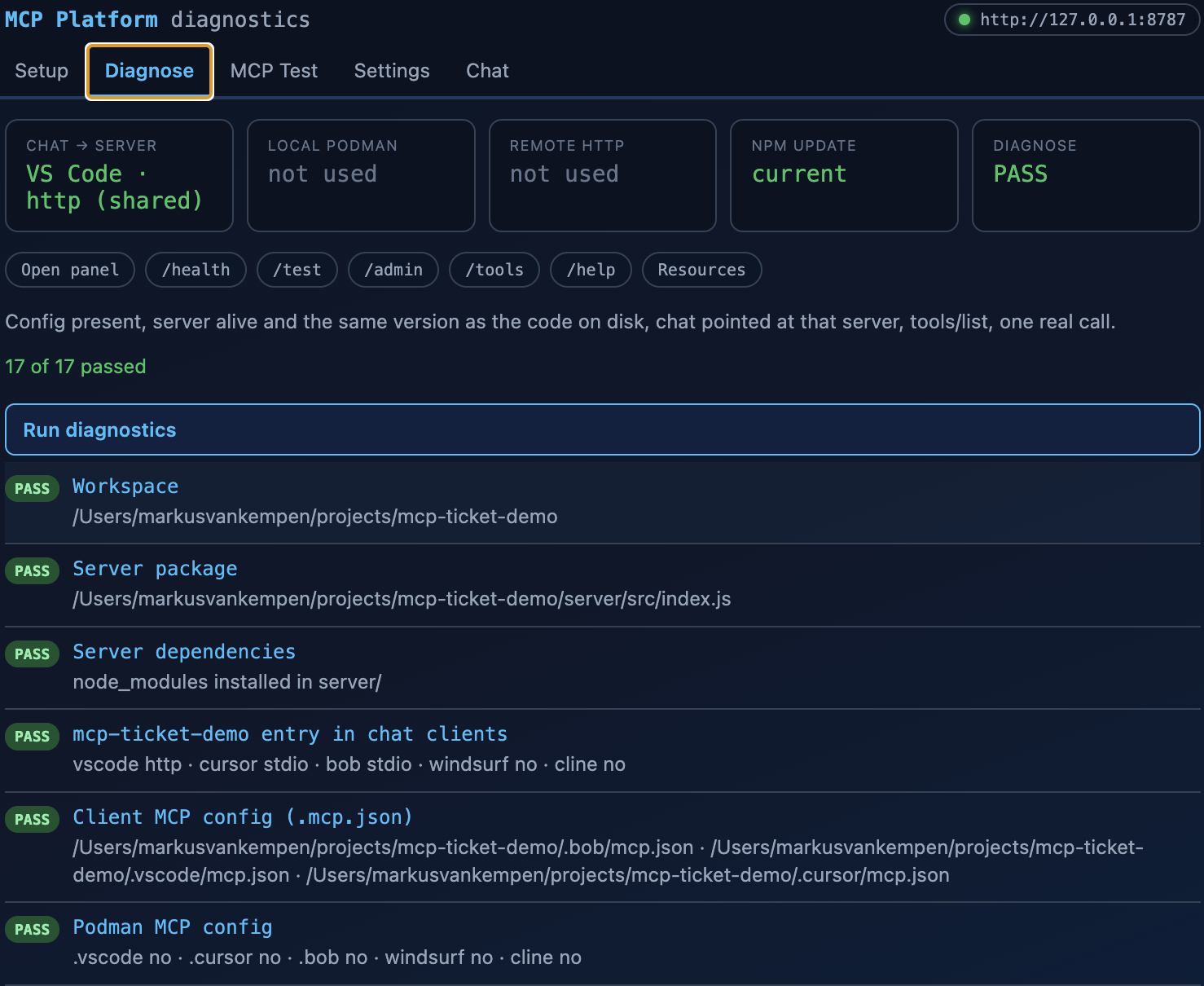
Extension diagnostics, 17 of 17 passed
The extension is the front door.
The MCP server is the capability.
03 · Which server answers?

Which server is the client
actually talking to?

Two memories

Each IDE's stdio config spawns its own copy.

A stale copy

npx …@latest in the IDE, a bundled copy in the extension.

A stranger on the port

Another server answered. Its tools showed up as mine.

FIX

HTTP by default

The extension and every mcp.json point at one server. One process, one memory.

# every copy says which copy it is { "service": "mcp-ticket-demo", "instance": { "label": "local", "id": "Markuss-MacBook-Pro.local", "url": "http://127.0.0.1:8787" } }

Same instance on /health, /test, /tools and describe_server. The extension checks it before trusting the tool list.

04 · When OK wasn't OK

The call succeeded.
The outcome was wrong.

# 201 Created Owner: mcp-bot@service.local The customer never heard back.
# 403 Forbidden The model retried. And retried. "The system is unavailable."
A tool isn't done when the API call succeeds.
It's done when the next thing that happens is right.
04 · How we stopped it

Tell the model before.
Tell it again after.

# the tool description (before the call) create_ticket "Open a support ticket. ALWAYS pass requester_email — the real customer's email. If you leave it out, the bot owns the ticket."
# the tool result (after the call) { "ok": true, "status": 201, "warning": "The bot owns this ticket. Replies go to the bot.", "next": "Call create_ticket again with requester_email set." }
The description stops the mistake.
The result catches the one that slips through.
04 · Errors that teach

A wrong call should
teach the right one.

# 403 Forbidden → the model tweaks a field → tries again, and again → "the system is unavailable"
{ "ok": false, "status": 403, "error": "key has scopes [read] but create_ticket requires the write scope. Issue a key with that scope on /admin, then retry once." }
A bare refusal starts a loop.
A refusal that names the fix ends it.
05 · Past a hundred tools

More tools didn't mean
more capability.

— BEFORE — query_records query_with_filter query_with_fields query_object_structure query_work_orders query_assets query_locations … Every name correct. The model still picked wrong.
— AFTER — describe_server what am I allowed to do? get_schema what can I query? get_schema name what shape do I need? run_query ask the question Three tools instead of seven. Selection stopped being a coin flip.
Technically precise.
Operationally confusing.

Same fix in Code Engine MCP: about 112 tools to 28, one per noun with an action field. In this demo: 31 tools to 19. Backup slide after the close.

05 · Past a hundred tools · the rule

Think of it like a database.
Reads are queries. Writes stay verbs.

≈ CATALOG

What exists?

describe_server
get_schema

≈ SELECT

Read it

run_query
tickets · customers · trace

≈ INSERT · UPDATE

Change it

create_ticket
add_comment
close_ticket

≈ ALTER · GRANT

Operate it

update_settings
issue_api_key

One query tool grows with schemas.
Each write keeps its own name, scope and warning.
06 · A control plane · demo

The server got its own UI.
Then it became the control plane.

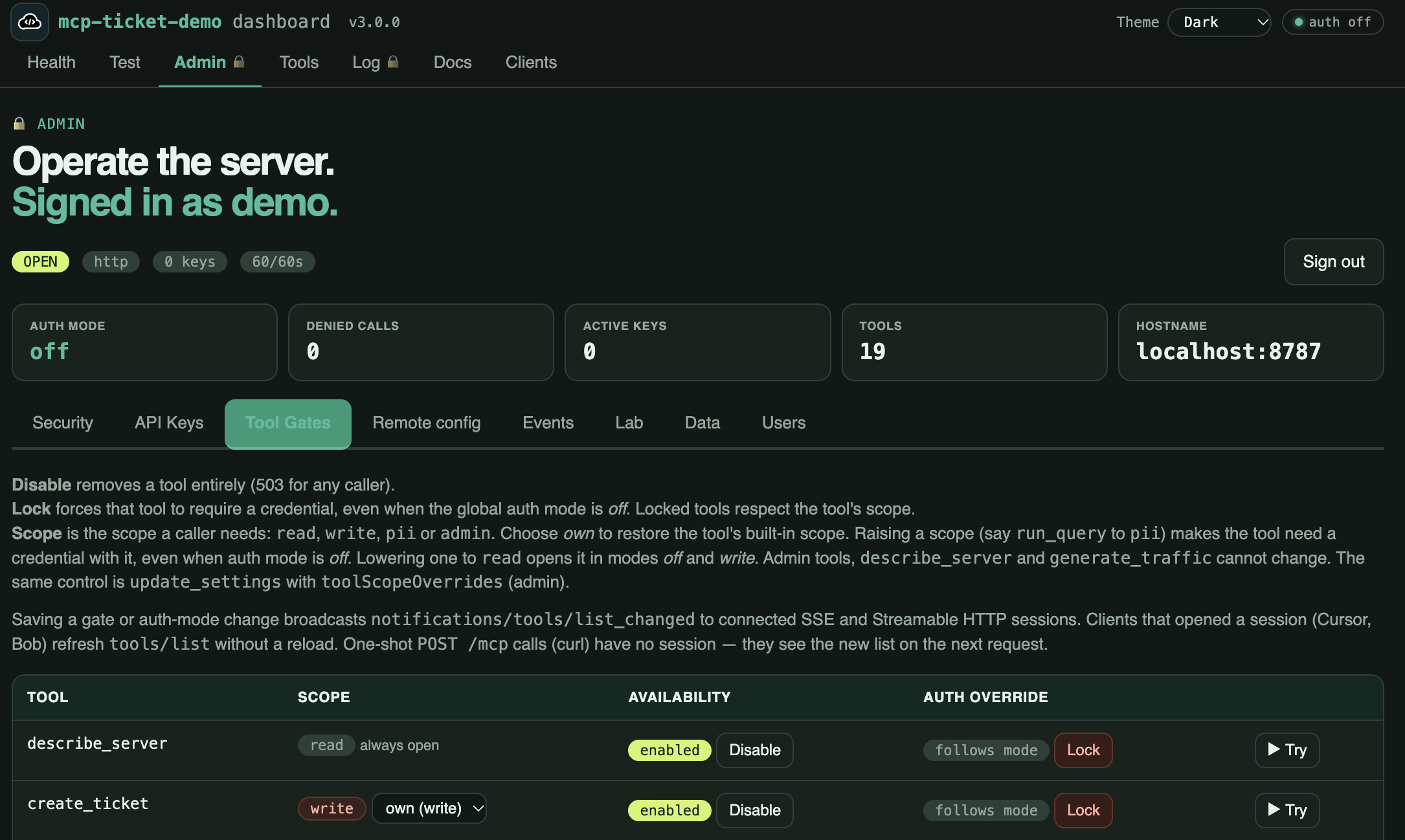
/health /test /tools see it, try every tool /admin keys · scopes · gates /log audit trail · call trace
The server's /admin page, Tool Gates tab: auth mode, keys, tool count, and per-tool scope, disable and lock.
WHY

Not everyone has the IDE

Ops, security and support open a URL. Nothing to install.

WHY

It lives with the server

A hosted copy has no editor next to it. Its UI runs where it runs.

WHY

One source of truth

Keys, gates and the trace live on the server, for every client.

07 · Remote configuration

Configure the server remotely.
Every button is also a tool.

# on /admin Change the auth mode Issue an API key Add a user Read the call trace
# the same, as tools server_access server_api_keys server_users server_log
WHY

Fleet management

One script makes the same change on every copy: local, staging, production.

WHY

Incident response

Revoke a key or lock a tool everywhere, in seconds.

WHY

Agents run ops

An ops agent rotates keys and reads the trace. No browser.

Same scopes. One audit trace. No browser, no redeploy.

08 · The server talks back

From a server you call
to a server that tells you.

POLL

The agent keeps asking

"Anything new?" on a loop. Most answers are no, and every check costs tokens.

PUSH

The server tells you

One open stream. ticket.* events arrive when they happen.

# the server says ticket.created "Checkout is down" Third in ten minutes.
# an agent reacts run_query tickets "down" add_comment on all three: "Known incident, on it."
# a human is paged "Three outage tickets. One incident?" → confirms, takes over.
Agents that act when something happens,
not only when someone asks.
What carries to the next server

MCP servers can become
more than integrations.

On your next server:

  1. 01Prove it. /health with a tool count, and a /test that calls the tools.
  2. 02 · 06Give it front doors. Bundle the server in an IDE extension (one install, one-click setup, Diagnose), and a UI for the people who operate it.
  3. 05Make it discoverable. describe_server first, get_schema for the shape, tool names that say the intent.

All three are in MCP Demo v3.0.1. Clone it and copy what you need.

The extension and the MCP UI are the control plane.
The MCP server is the capability.
The agent is the operator.
Thank you

Build one.
Publish it.
Make the next one easier to use.

Start with MCP Demo. Clone it, break it, read the refusals — every example in this talk is in there.

MCP Demo — every example from this talk · wxo-labs — 14 hands-on labs, two on MCP
No bug too small, no syntax too weird.
QUESTIONS?

Markus · Research · Floor 7½ 🏢🤏

Backup slides follow — press → for acronyms, publish, deploy, auth, the curl demo, testing, and how to run the demo tonight.

Appendix · Legend 1 / 4

The acronyms.
What they actually mean.

TermStands forWhy it shows up in this talk
MCPModel Context ProtocolThe open standard. Clients discover and call tools; servers wrap APIs.
WXOwatsonx OrchestrateIBM's agent orchestration platform. Labs 7–8; two servers in the portfolio.
CRNCloud Resource NameIBM Cloud's globally unique ID (crn:v1:…). New project → new CRN → often a new hostname.
APIApplication Programming InterfaceThe enterprise system behind the MCP server. A 200 is not a finished tool.
ADKAgent Developer KitHow WXO imports an MCP server as a toolkit.
CECode EngineIBM Cloud serverless containers. The "cloud containers" domain.
IAMIdentity and Access ManagementWhy a missing tenant header fails every job while auth still looks "fine."
Appendix · Legend 2 / 4

How MCP
actually talks.

TermWhat it isWhere it runs
JSON-RPC 2.0The message format MCP speaks. Identical on every transport.Both
stdioThe client launches your server as a child process and talks over stdin / stdout.Local only — no port, no URL. Secrets come from env vars.
SSE
Server-Sent Events
text/event-stream over plain HTTP. Long-lived GET carries server→client; a separate POST carries client→server.Remote — whatever port your HTTP server binds; 443 over HTTPS in production.
Streamable HTTPThe current remote transport. One endpoint, and a response can upgrade into an SSE stream. Supersedes the older HTTP+SSE pair.Remote — same HTTPS port.
tools/listThe call a client makes to enumerate what a server offers.Both — "0 tools discovered" means this came back empty.
stderrWhere diagnostics go on stdio. stdout is the protocol.Local — console.log corrupts JSON-RPC. Use console.error.
Appendix · Legend 3 / 4

Packaging,
config and distribution.

TermWhat it isWhy it shows up in this talk
mcp.jsonClient config naming a server, its command or URL, and its env vars.Lives in .vscode/ or .cursor/. The extension writes it for you.
npxRuns an npm package without installing it first.The shortest path from "found it" to "called it".
package rootZips your server directory and uploads it so a cloud runner executes from a relative path.The fix for 0 tools discovered (Appendix · The messy parts).
/health /test /adminIs it alive, does it really work, can it be operated — my convention, not the spec.What a deployed server needs to explain itself.
scopeA label on a credential — read, write, pii — naming what that credential may do.How a server refuses with a reason instead of a bare 403 (Appendix · 403).
MCP RegistryThe community index of published servers.One of the places to be findable (Appendix · Publish).
Open VSXVendor-neutral extension marketplace for VS Code-compatible editors.Where extensions land outside the Microsoft marketplace.
Appendix · Legend 4 / 4

The short words.
cwd, env, PII, and the rest.

TermStands forWhy it shows up in this talk
cwdcurrent working directoryThe folder the process starts in. Appendix · The messy parts: set it to the package you shipped, not a path from your laptop.
envenvironment variablesHow a local stdio server gets secrets. Same checks belong on every server — slide 18.
npmNode Package ManagerWhere the code is hosted. Publish here first, then the registry name.
.vsixVisual Studio extension packageThe file you upload to Open VSX. Not the registry, not npm.
PIIPersonally Identifiable InformationA scope in the demo. Without it, a customer's phone comes back as REDACTED: same call, fewer fields.
CIContinuous IntegrationWhy a remote URL matters: a pipeline cannot use your laptop's stdio path.
IDEIntegrated Development EnvironmentVS Code, Cursor, Windsurf, Bob — four copies of mcp.json (Appendix · The messy parts).
HTTPSHTTP over TLS (port 443)What a shared remote server should speak. The hostname is not something you paste by hand.
Appendix · Publish

Ship the package.
Then ship the name.

The registry does not host your code. npm does. Publish npm first, or the name publish fails.

  1. Bump the version in two files — package.json and server.json, same number.
  2. Publish the package — npm publish --access public from server/, not the repo root.
  3. Wait about a minute. npm is not instant.
  4. Publish the name — mcp-publisher publish. Then open both pages.

If it has an extension: package the .vsix and upload it to Open VSX. The registry name must start with io.github.youruser/.

Appendix · Deploy

From the laptop
to a shared URL.

Publish puts a name on the registry. This is how the same server becomes a URL your team can call.

01

Laptop

npx or stdio. Fast feedback. Credentials stay on your machine. No port, no URL.

02

Container

Same package, relative path. A Dockerfile so a cloud runner is not looking at /Users/me/….

03

Shared URL

HTTPS, server-side secrets, /health /test /admin. Read the hostname after deploy — never paste it by hand.

The package is what you ship.
The URL is what you look up after it lands.
Appendix · Auth

Three modes.
Discovery stays open in all of them.

None of this is in the spec. Flip the mode on /admin, then call the same write tool twice.

off

Laptop default

Anyone can call anything. Fine on your machine. Do not put this on a public URL.

write

Reads stay open

Queries are free. Create, comment and close need a write key. Personal fields stay redacted without pii.

all

Public URL

Every tool call needs a credential. The refusal names the scope and where to get one.

A locked tool still shows up in tools/list.
The refusal is the only place left to explain yourself.
Appendix · The messy parts

The failures that
taught me the most.

What I sawWhat was actually wrongWhat I changed
0 tools discoveredI gave a cloud runner a path from my laptopShip the package, run from a relative path
A strange vendor error, never a 404Wrong API host — it answered something elsePin the confirmed host and assert it at startup
Auth looked fine, every call failedA required tenant header was missingCheck required headers before the first call, not after
mcp.json worked yesterdayRedeploying gave the service a new hostnameRead the endpoint after deploy; never paste a URL by hand
Four copies of mcp.jsonSame server in four IDEs, four slightly different schemasOne source of truth; let the extension write the client file
The model picked the wrong toolSeven near-identical query_* namesOne query tool plus schema discovery
Client hung, or a JSON parse errorconsole.log wrote into the stdio streamLog to stderr — console.error
Mocks green, live call returned 403Update sent PATCH; that API only accepts PUTKeep an opt-in live test next to the mocks

Most of these failed silently. That's the pattern I'd warn my past self about.

Appendix · The curl demo

The schema demo,
copy-paste.

export MCP=http://localhost:8787/mcp # or your deployed URL + /mcp, with an API key mcp() { curl -s "$MCP" \ -H 'Content-Type: application/json' \ -H 'Accept: application/json, text/event-stream' \ -d "{\"jsonrpc\":\"2.0\",\"id\":1,\"method\":\"tools/call\", \"params\":{\"name\":\"$1\",\"arguments\":$2}}"; } mcp describe_server '{}' mcp get_schema '{}' # no name: the list mcp get_schema '{"name":"tickets"}' mcp run_query '{"schema":"tickets","filter":{"status":"open"}}' mcp run_query '{"schema":"orders"}' # the error names the next call
Appendix · Metadata and errors

Shape, meaning, permission:
five calls.

# 1 · what the client sees: hints, required, output shape mcp '{"jsonrpc":"2.0","id":1,"method":"tools/list"}' # 2 · good call: structuredContent + next mcp '{"jsonrpc":"2.0","id":2,"method":"tools/call","params":{"name":"run_query","arguments":{"schema":"tickets","filter":{"id":"TCK-1001"}}}}' # 3 · wrong shape: SDK rejects, -32602, no next mcp '{"jsonrpc":"2.0","id":3,"method":"tools/call","params":{"name":"add_comment","arguments":{}}}' # 4 · wrong meaning: zero rows + next: "Do not invent a TCK- id" mcp '{"jsonrpc":"2.0","id":4,"method":"tools/call","params":{"name":"run_query","arguments":{"schema":"tickets","filter":{"id":"TCK-9999"}}}}' # 5 · no permission: 401, where to get a key, do not retry unchanged mcp '{"jsonrpc":"2.0","id":5,"method":"tools/call","params":{"name":"create_ticket","arguments":{"subject":"x","body":"y"}}}'
Appendix · Bundles

Bundle the names.
Keep the handlers.

01

Route, don't rewrite

A thin table over handlers you already trust. ticket + create calls the old create_ticket.

02

Check the real tool

Scopes on the underlying action: search needs read, create needs write.

03

Flat, not oneOf

An action enum whose description says what each action needs.

04

Old names stay

Callable but unlisted, so saved prompts and scripts keep working.

ticket: { id: "ticket_id", actions: { search: { tool: "search_tickets" }, create: { tool: "create_ticket" }, comment: { tool: "add_comment" }, … } }
Check permissions on the action,
not on the bundle.

The pattern from Code Engine MCP. mcp-ticket-demo folded nouns instead: reads are run_query schemas, settings are one update_settings patch, writes stay verbs.

Appendix · 201 attribution

The hardest tool wasn't
the complicated one.

SHIPPED

create_ticket

Two parameters. Returned 201 Created every single time.

BROKE

Wrong owner

The requester was my API service account, so the platform mailed every reply to the bot — not the customer.

FIXED

Requester attribution

Make the customer required. Never fall back to the bot silently — and have the result say who owns the ticket.

Try it tonight: clone mcp-ticket-demo, call create_ticket without requester_email, then look at who owns the ticket. Steps are in the appendix.

A tool isn't done when the API call succeeds.
It's done when the next thing that happens is right.
Appendix · 403

A bare 403
eats tokens.

# What I shipped first 403 Forbidden The model retried. Then retried again. Then told the user the system was "unavailable."
# What it says now create_ticket needs "write". This key has [read]. Issue one with that scope on /admin → API keys. → it asks for a key instead of looping.
A locked tool still shows up in tools/list.
The refusal is the only place left to explain yourself.

Three modes in the demo: off on your laptop, write so reads stay open and writes need a key, all for anything with a public URL. Discovery stays open in every mode — a client that can't ask "what do you need from me?" can only guess.

Appendix · Naming

With a few tools, names barely matter.
With dozens, the name is all the model has.

# what I shipped first request(path, method, query, body) Less code for me. Every decision for the model: which path, which verb, which fields.
# what the model can use search_tickets(query, status, requester_email, limit) The intent is in the name. The choices are in the brackets.
Name the tool after what the human wants done,
not after the HTTP call underneath.
Appendix · Testing

Bundling forced a test
for every action.

Offline, every action

A fake API answers. Arguments come from get_schema. An untested action fails the build.

Live, opt-in

Read-only by default. With a flag: create, then delete in finally. Keys never printed.

Found byThe bug — already in the old tools
LiveUpdate sent PATCH. That API only accepts PUT — 403, with every mock green.
OfflineA path check compared /var/… with /private/var/… and refused valid paths on macOS.
LiveThe test was wrong about a JSON key. A mock is only as good as its assumptions.

In mcp-ticket-demo: tests call the tools over MCP, in-process and over HTTP, and pin the tool count. npm run package refuses to build the extension if its bundled server has drifted.

Appendix · Try it tonight

Clone the repo.
Run it in about ten minutes.

Every example in this talk is in MCP Demo. Personal open-source project. Slides: linuxfoundation-mcp-dev-summit · You need Node 18+.

git clone https://github.com/markusvankempen/mcp-ticket-demo cd mcp-ticket-demo/server npm install npm run http

Is it alive?

Open http://127.0.0.1:8787/health

Does it work?

Open http://127.0.0.1:8787/test — it creates and finds a ticket.

Can you operate it?

Open http://127.0.0.1:8787/admin — login demo / demo.

Run the tests: npm run test:all from server/ (or mise run test-all; mise pins Node 22). Editor path: in another terminal, npm run stdio from server/. Load the extension from extension/. Next slide is four things to try.

Appendix · Try these four

Same lessons.
Now you can reproduce them.

#What to doWhat you should see
1 · AttributionCall create_ticket directly — from /admin, the /help curl block, or the extension's test — with a subject and body only. Leave requester_email out. Then open the ticket. (A chat model reads the tool description, which says to pass the email, so it usually will. Call it yourself.)201 Created. The requester is the API service account, not a customer. Call it again with an email — the owner changes.
2 · The extensionLoad the extension in extension/. Discover the mcp.json already in the workspace. Diagnose in order. Test run_query on tickets with a real query.Each step pass or fail. The first red step is the actual problem — you do not retype config.
3 · AuthOn /admin, set mode to write. Call create_ticket with no key. Issue a key with the write scope. Call it again.First call refuses and names the scope. Second call works. The tool never disappeared from tools/list.
4 · FindabilityIn a clean browser, search MCP server for ticket triage. Then search Zendesk MCP. No server required.Capability search is noise. Product-name search is first page.

Optional fifth: call describe_server, then get_schema with no name, then with a name, then run_query — three tools instead of a pile of query_*. Full walkthrough: the README in the repo.

Appendix · Contact

Questions after the talk?
Both inboxes reach me.

Markus · Research · Floor 7½ 🏢🤏

Work

mvankempen@ca.ibm.com

IBM — Executive Architect & Venture Capitalist in Residence

Old friend

markus.van.kempen@gmail.com

Open source, and anything in this deck

Portfolio

markusvankempen.github.io

Every server and extension this talk refers to

Start with MCP Demo — every example from this talk is in it. No bug too small, no syntax too weird.

01 / 19 PDF 00:00
Enter → go · Esc → cancel